

Rosie vs Jobber AI Receptionist (2026): Pricing, Booking and Which to Choose

Prices and facts checked October 20, 2026. We don't accept payment for rankings. If you buy through some links on this page we may earn a commission, at no cost to you. How we make money

On this page
Short answer: if you already run your business on Jobber, start with Jobber's AI Receptionist. It costs $29 a month for 30 conversations, books visits straight into your Jobber schedule and uses the data already in your account. Rosie is the better fit if you're not on Jobber, need Spanish on every call, or take a lot of calls: its $149 plan includes 1,000 minutes, which works out cheaper than Jobber's per-conversation pricing at high volume.
Our picks
- Best if you already use JobberJobber AI Receptionist: $29/mo add-on, 30 conversations included See Jobber
- Best standalone and for high call volumeRosie: from $49/mo for 250 minutes See Rosie
Side-by-side comparison
| Rosie | Jobber AI Receptionist | |
|---|---|---|
| Price | $49 / $149 / $299 per month | $29/mo add-on; included with unlimited use on Jobber Plus |
| What's included | 250 / 1,000 / 2,000 minutes | 30 conversations, then $0.79 each (or pause at the limit) |
| Needs | Nothing else; works with any business phone | A Jobber subscription and a Jobber dedicated phone number (US, Canada, UK) |
| Books appointments | $49: sends booking links by text. $149+: books on your connected calendar | Books visits into your Jobber schedule using your online booking settings |
| Logs to Jobber | Yes: calls, texts and chats logged as client notes (all plans) | Native: leads and appointments go straight into Jobber |
| Emergency calls | Live and warm transfers on $149+; multi-number "waterfall" transfers on $299 | Keyword escalation (e.g. "burst pipe"): transfer the call or text you a transcript and callback link |
| Languages | English and Spanish on every plan | Not stated |
| Texts | Texts callers (booking links on $49, during the call on $149+); website texting $50/mo add-on | Answers texts as well as calls |
| Recordings and transcripts | Yes, all plans | Yes, in the Receptionist dashboard |
| Free trial | 7 days | Jobber's 14-day trial (no card) |
| Overage price | Not published | $0.79 per extra conversation |
Sources: Rosie pricing; Jobber pricing; Jobber Help Center: Receptionist; Jobber AI Receptionist; Rosie Help: Jobber integration.
Pricing: minutes vs conversations
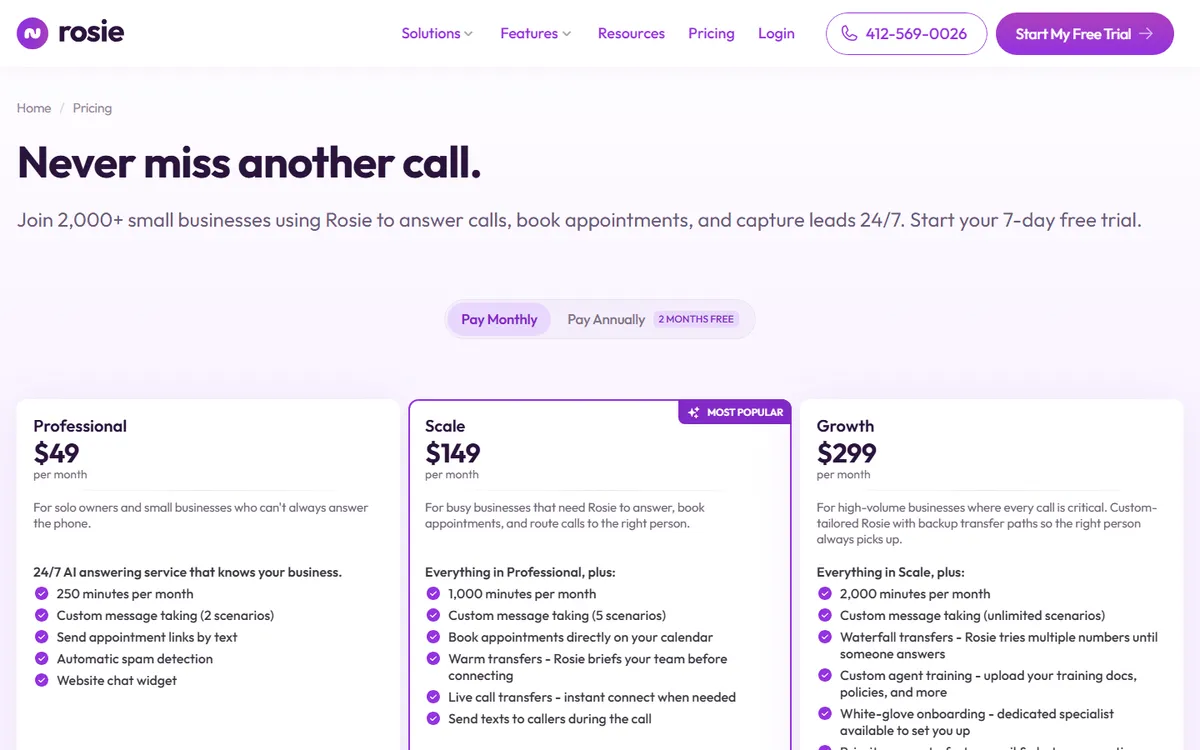
The two charge in different units, so compare them on your call volume.
- Jobber counts conversations: a call, or a text thread that stays open for up to 24 hours. Spam and calls with no real interaction don't count. You get 30 for $29, then $0.79 each, with email alerts at 75% and 100% of your limit (Jobber Help Center).
- Rosie counts minutes: 250 on Professional ($49), 1,000 on Scale ($149) and 2,000 on Growth ($299). Rosie doesn't publish what happens past your allowance, so pick a plan with headroom (Rosie pricing). Paying annually gets "2 months free".
Monthly cost by call volume (our maths):
| Calls answered per month | Jobber AI Receptionist | Rosie (assuming 3-minute calls) |
|---|---|---|
| 30 | $29 | $49 (Professional, 90 min) |
| 60 | $52.70 | $49 (Professional, 180 min) |
| 100 | $84.30 | $149 (Scale; 300 min is over Professional's 250) |
| 200 | $163.30 | $149 (Scale, 600 min) |
| 300 | $242.30 | $149 (Scale, 900 min) |
Jobber's figures are $29 plus $0.79 for each conversation over 30, and include texts. Rosie's depend on call length: at 5 minutes a call, 60 calls is 300 minutes and needs the $149 plan. Remember Jobber's add-on also requires a Jobber subscription (from $29/mo billed annually for Core after its intro price, per Jobber pricing). If you're not already a Jobber customer, that changes the maths completely. Try your own numbers in our AI receptionist cost calculator.
Booking: the biggest practical difference
Jobber's Receptionist books visits directly into your Jobber schedule during the call, using your existing online booking settings. New leads and appointments land in your schedule and client list without any setup, because it already has your Jobber data (Jobber). It can also cancel and reschedule appointments, create follow-up tasks, and handle several calls at once (Jobber Help Center).
Rosie works differently. On the $49 plan it texts callers a booking link. On $149 and up it books directly on your connected calendar (Rosie pricing). Its Jobber integration, included on every plan and every Jobber plan, logs calls, texts and chats as notes on the matching Jobber client and creates new clients for first-time callers, but it doesn't book visits into Jobber itself (Rosie Help). Rosie has a similar logging integration for Housecall Pro, which needs Housecall Pro's MAX plan for API access.
Bottom line: if you want jobs to appear in your Jobber schedule automatically, Jobber's own Receptionist does that natively.
Emergency calls and transfers
For trades, after-hours emergencies matter most.
- Jobber lets you set escalation keywords such as "emergency", "no heat" or "burst pipe". When a caller uses one, it can transfer the call or text your escalation contact a transcript snippet and a callback link. The escalation number must differ from your business number (Jobber Help Center).
- Rosie offers live and warm transfers on Scale ($149) and waterfall transfers that try several numbers in turn on Growth ($299). The $49 plan doesn't list transfers (Rosie pricing).
Whichever you choose, call it yourself after hours during the trial, once as an emergency and once as a routine booking, and check what it promises callers.
Spanish and other features
- Rosie answers in English and Spanish on every plan, with 10+ voices, a custom greeting, your choice of area code, spam detection, and training pulled automatically from your Google Business Profile and website (Rosie pricing).
- Jobber lets you set separate business-hours and after-hours greetings and phone menus, and recommends telling callers the line is answered by AI or may be recorded (Jobber Help Center). Its pages don't state language support.
Recording calls brings legal duties in some states, so check our AI receptionist call recording laws guide. If either tool texts customers, the TCPA opt-out rules apply too.
What reviews say
Independent reviews of these specific features are thin, so treat them carefully.
- Rosie has no reviews on Trustpilot (Trustpilot). A September 2026 review by CloudTalk, a competitor, noted it found no reviews on G2, Capterra or Trustpilot and an App Store rating of 4.1 from just 9 ratings. It praised the simple setup and published minute allowances, and criticised the unpublished overage rate and scenario-based conversations that suit predictable calls better than complex ones (CloudTalk).
- Jobber shows a 4.5 rating from 4,883 Google Play reviews, but that covers the whole Jobber app, not the Receptionist specifically (Jobber). See our Jobber vs Housecall Pro comparison for wider Jobber reviews.
Which should you choose?
Choose Jobber AI Receptionist if you…
- Already use Jobber
- Want jobs booked straight into your Jobber schedule
- Get fewer than about 100 calls and texts a month
- Want keyword-based emergency escalation
Choose Rosie if you…
- Don't use Jobber, or use Housecall Pro or no software
- Need English and Spanish on every call
- Take 150+ calls a month (Scale's 1,000 minutes)
- Want multi-number transfers for emergencies ($299)
Before you commit:
- Count your calls. Check last month's missed and answered calls, and estimate average length.
- Use the free trials: 7 days for Rosie, 14 for Jobber. Test an after-hours emergency and a routine booking.
- Ask Rosie for its overage rate in writing before choosing a plan.
- Set expectations with callers: a short "you're speaking with our AI assistant" line is good practice, and in some states the law requires recording notice.
For more options, including other standalone services, see our best AI receptionist for contractors guide.
FAQ
Is Jobber's AI Receptionist free?
No. It's a $29/month add-on that includes 30 conversations, with extra conversations at $0.79 each. It's included with unlimited usage on Jobber's Plus plan.
Does Rosie work with Jobber?
Yes. Rosie's Jobber integration is included on every Rosie plan and works with every Jobber plan. It logs calls, texts and chats as notes on Jobber clients, but doesn't book visits into Jobber; booking runs through your connected calendar.
Which is cheaper, Rosie or Jobber's AI Receptionist?
It depends on volume. For 30 calls a month, Jobber's $29 add-on is cheaper. Above roughly 200 calls a month, Rosie's $149 Scale plan (1,000 minutes) usually costs less. Jobber's add-on also requires a Jobber subscription.
Does Rosie speak Spanish?
Yes. Rosie answers in English and Spanish on every plan.
Sources
Pages we used for this article, checked on or before the update date above.
- Rosie pricing · heyrosie.com
- Jobber pricing · getjobber.com
- Jobber Help Center: Receptionist · help.getjobber.com
- Jobber AI Receptionist · getjobber.com
- Rosie Help: Jobber integration · heyrosie.com
- Trustpilot · trustpilot.com
- CloudTalk · cloudtalk.io
Changelog: Oct 20, 2026: first published.